Be Nice · Open source · macOS
Say what you mean in Slack — without sounding rude.
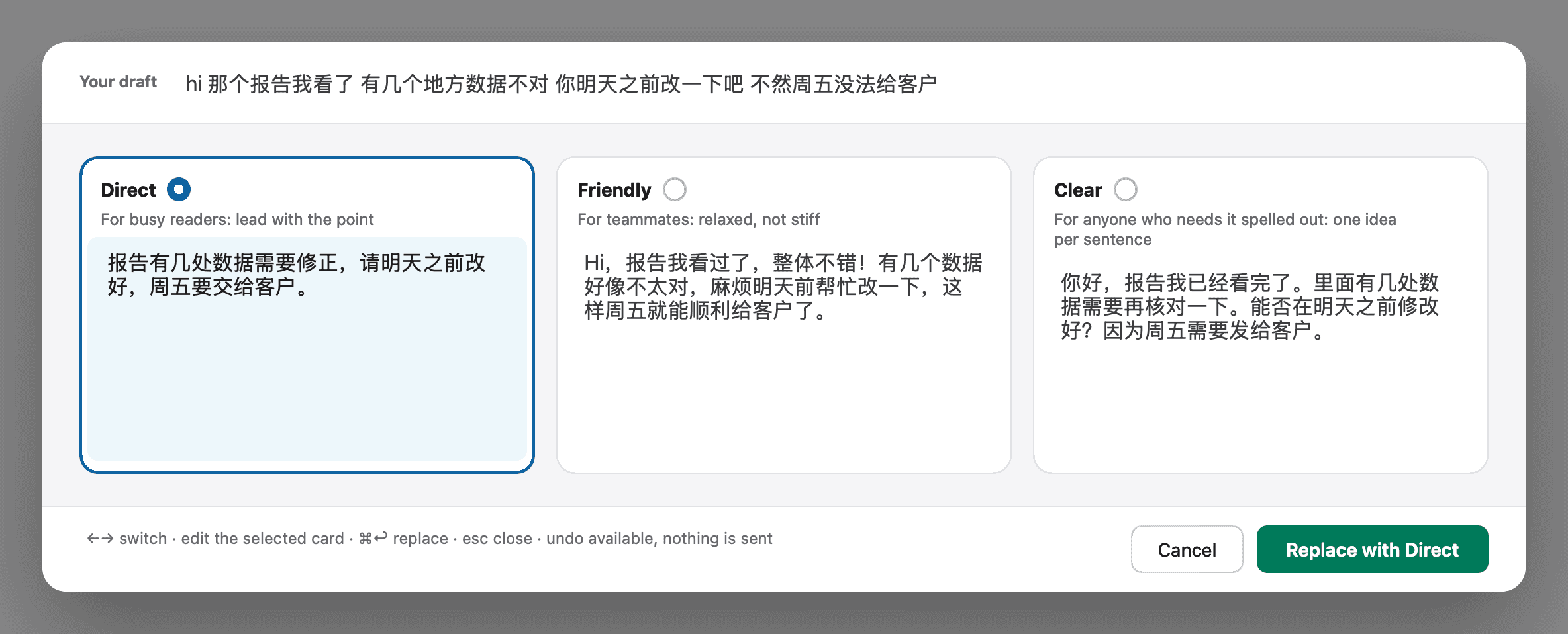
Be Nice rewrites your draft right in the message box, three ways. You pick, you edit, you hit send. Free, open source, works with your own model or Ollama.
Your words, just kinder. It never sends anything — you do.
The problem
A plain request can read as annoyed.
You read your draft back and wonder if you sound irritated, when you’re only asking someone to do something.
Rewriting elsewhere takes five steps.
Copy, switch to ChatGPT, paste, copy back, paste again. All for one Slack message.
English isn’t everyone’s first language.
You know what to say, but not always the softer way to say it.
How it works
01
Type a draft in Slack
Write as usual. No need to select anything; Be Nice rewrites the whole draft.
02
Click Rewrite, or press ⌃⌥⌘Space
The Rewrite button sits above Slack’s message box. You get three versions.
03
Pick one and replace
Edit it if you like, then confirm. Your draft is replaced in place, and Undo brings the original back.
What it does
Never sends for you
Be Nice only edits the draft; you still press send. If it can’t safely confirm the target message box, it refuses to replace and offers copy only.
Replace in place, undo anytime
The version you pick replaces your draft in Slack’s message box. A visible Undo button restores your original text.
Bring your own model
Use GitHub Copilot through the GitHub login already on your Mac, or any OpenAI-compatible endpoint, including Ollama or LM Studio on your own machine. Be Nice has no server of its own and bundles no model. With Copilot or a remote endpoint, your draft is sent to that provider.
Open source, MIT
Read the code, build it from source, or open an issue on GitHub.
Install
- 01Download
BeNice-0.2.0-macos.zipfrom Releases ↗. - 02Unzip it and move Be Nice.app to Applications.
- 03The app isn’t notarized (no Apple Developer ID). The first time, right-click → Open and confirm.
- 04When asked, grant Accessibility access in System Settings → Privacy & Security. It’s needed to read and replace the text in Slack’s message box.
- 05Open Settings from the menu-bar icon, choose a model source and click Save. Nothing is sent until you do.
Status and limits
- Slack desktop app on macOS only. Other apps are not supported.
- Verified in real Slack: channels, threads and direct messages with plain-text drafts, including Chinese drafts.
- Drafts with links, mentions, lists, formatting or emoji are copy-only: Be Nice won’t replace them.
- Not yet verified: Chinese IME composition, emoji, and two conversations with the same name.
- No personal style learning yet.
Be Nice is an independent project and is not affiliated with, endorsed by, or sponsored by Slack Technologies.
Get it
Free and open source. Download it, star it, or open an issue.